
Chart of Accounts Template for Rental Properties (QBO + STR/LTR)
A chart of accounts (COA) is the category structure that makes your rental bookkeeping consistent and tax-ready. This template gives landlords and STR hosts a clean, lean COA that separates income, operating expenses, and capital improvements, while keeping reporting accurate by property (without creating a mess of duplicate accounts).
Last updated: January 11, 2026
Quick links:
Ongoing support: Monthly Bookkeeping
Behind on your books: Catch-Up & Cleanup
Plan details: Pricing
STR payouts: STR Payout Reconciliation Guide
Table of Contents
The 3 rules for a rental-property chart of accounts
- Keep it lean. Too many categories create inconsistency and miscategorization.
- Do not create a separate COA per property. Track by property using classes/locations/tags (depending on your system) and keep one consistent category set.
- Separate repairs vs improvements. Routine repairs stay in expenses; improvements should be tracked as capex/fixed assets and reviewed with your CPA.
Recommended chart of accounts
| Account name | Type | Notes |
| Rental Income | Income | LTR rent; assign to the correct property each time |
| STR Rental Income | Income | Record gross revenue (don’t use net deposits) |
| Cleaning Fee Income | Income | If paid to you; otherwise treat as pass-through per your method |
| STR Platform Fees | Expense | Airbnb/VRBO host fees and processing fees |
| Repairs & Maintenance | Expense | Routine repairs; flag anything that feels like an upgrade |
| Management Fees | Expense | PM fees, leasing fees |
| Utilities – Electric | Expense | Owner-paid |
| Utilities – Gas | Expense | Owner-paid |
| Utilities – Water/Sewer | Expense | Owner-paid |
| Insurance | Expense | Property/landlord/STR |
| Property Taxes | Expense | RE taxes |
| Mortgage Interest | Expense | Interest portion (or record via split from payment) |
| Supplies | Expense | STR consumables and property supplies |
| Fixed Asset – Improvements | Asset | CapEx (roof, HVAC, renovation) |
| …. See link to download the whole chart of accounts template |
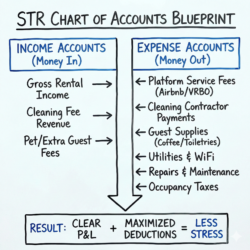
Add these accounts if you operate STR:
STR add-ons (if you host)
- STR Rental Income (gross)
- Cleaning Fee Income (if applicable)
- STR Platform Fees
- STR Software & Subscriptions
- Licenses & Permits
- Occupancy Taxes Payable (only if you remit)
Download the template (CSV)
Download the CSV template and use it as your category blueprint. If you want to import into software, align the columns to your system’s import format or manually create the accounts from this list.
Setup steps (QuickBooks Online or Stessa)
QuickBooks Online (simple approach)
Stessa (simple approach)
- Create accounts from the template (start with income + major expense categories).
- Choose a property tracking method (classes/locations) and use it consistently.
- Keep “Improvements/Capex” separate from repairs.
- Reconcile monthly so your reporting stays reliable.
- Ensure each transaction is assigned to the right property.
- Use consistent categories across months and properties.
- Confirm STR deposits are split into revenue/fees according to your STR payout method.
Common mistakes (and fixes)
- Too many categories → consolidate to the 15–25 that matter.
- Tracking by property using separate accounts → use tags/classes instead.
- Mixing capex into repairs → track improvements separately and review with CPA.
- Recording STR deposits as revenue → use your STR payout reconciliation workflow.
FAQ
How many accounts should a rental property chart of accounts have?
Enough to be accurate, not enough to be confusing. For most landlords, 15–30 core categories is plenty.
Should I create separate accounts for each property?
No. Use one COA and track by property using classes/locations/tags.
What is the difference between repairs and capital improvements?
Repairs keep the property in ordinary operating condition; improvements add value or extend useful life. When in doubt, flag it for CPA review.
Do I need different categories for STR vs LTR?
Usually only a few: platform fees, cleaning income, STR software, permits, and occupancy tax handling.